Memory
Cross-client long-term memory — a worked example of how vector search, LLM extraction, and cloud functions combine to give AI tools persistent understanding.
Every AI tool I use — Claude Desktop, Claude Code, a web chatbot, even an SMS agent — reads and writes through niu-memory. It’s the reason Claude knows what I was working on yesterday, even though yesterday’s session is long gone.
Building it myself wasn’t the goal — understanding the problem was. When you’ve watched extraction fail on ambiguous pronouns, seen deduplication break on paraphrased facts, and measured what “semantic similarity” actually returns at the vector level, you can walk into an evaluation of mem0 or Zep and ask the questions that a vendor demo will never surface.
This walkthrough traces two operations end to end: storing a new memory, and searching for one later. Along the way, you’ll see every layer of the stack — and what the data actually looks like at each stage.
TL;DR
- How an LLM extracts durable facts from raw conversation and what makes that extraction hard to get right
- Why text gets converted to vectors, and how a vector database finds memories by meaning instead of keywords
- How a dual-path search (semantic + entity graph) catches things a single approach would miss
- What this looks like at real scale: 8,046 facts extracted from months of daily use
- How a production memory system handles the hard operational problems: contradictions, stale data, pruning, and cross-device sync
The problem: AI amnesia
Every AI conversation starts from scratch. Claude doesn’t remember what you told it last week. And if you bounce between tools — a desktop app, a CLI, a chatbot — none of them share context. Each one is its own island. niu-memory is a shared layer that sits behind all of them, so every tool talks to the same persistent understanding of you.
The building blocks
Six technologies, each handling a distinct job:
| Component | Role | Why this one |
|---|---|---|
| AWS Lambda + API Gateway | Serverless runtime + HTTP front door | No servers to manage; pay only for actual compute time |
| Pinecone | Vector database — stores and searches by meaning | Hosted, no SQL, pure HTTP API; search by semantic similarity, not keywords |
| DynamoDB | Key-value store for structured data | User profiles and stable preferences that look like rows — not worth vectorizing |
| Voyage AI | Converts text to vectors; reranks search results | One HTTP call per sentence; reranker does a precision pass on candidates |
| Claude Haiku | Extracts facts from conversations; judges contradictions between new and stored facts | Fastest, cheapest Anthropic model — cheap enough to run on every turn and every conflict |
| MCP | Protocol layer so any AI tool can connect | Like a USB port for AI — anything that speaks MCP plugs in without custom wiring |
How a memory gets created
Steps with a blue stripe are AI-powered — that’s where the intelligence lives.
The request and identity
A hook fires at the end of each Claude Code turn, sending the exchange to niu-memory’s API — a Lambda function behind API Gateway.
Before any logic runs, a middleware layer resolves who you are from your API key. Every downstream operation is scoped to that identity — there’s no user_id parameter; the system infers it from your credentials. One user can never reach into another’s memories.
What extraction looks like
The raw conversation isn’t useful as memory — most of it is ephemeral instructions and code. niu-memory calls Haiku with a targeted prompt: given this exchange, extract any durable facts worth remembering. Haiku returns structured JSON — ["Peter is redesigning the projects page"] — or an empty list if nothing’s worth keeping.
This prompt is where the system’s judgment lives. Getting it right — what counts as a durable fact versus noise — is one of the harder design problems in the whole thing.
The hardest part isn’t the infrastructure — it’s the extraction prompt. Most of a conversation is ephemeral: instructions, code snippets, back-and-forth clarification. The prompt has to reliably distinguish signal (durable facts about you) from noise (transient task context). Tune too broadly and you store garbage; tune too narrowly and you miss things that matter. This is a judgment problem that the code can’t solve — it lives entirely in the prompt.
Here’s what extraction looks like at scale. After a month of daily use, this is the volume of facts pulled out of hundreds of conversations:
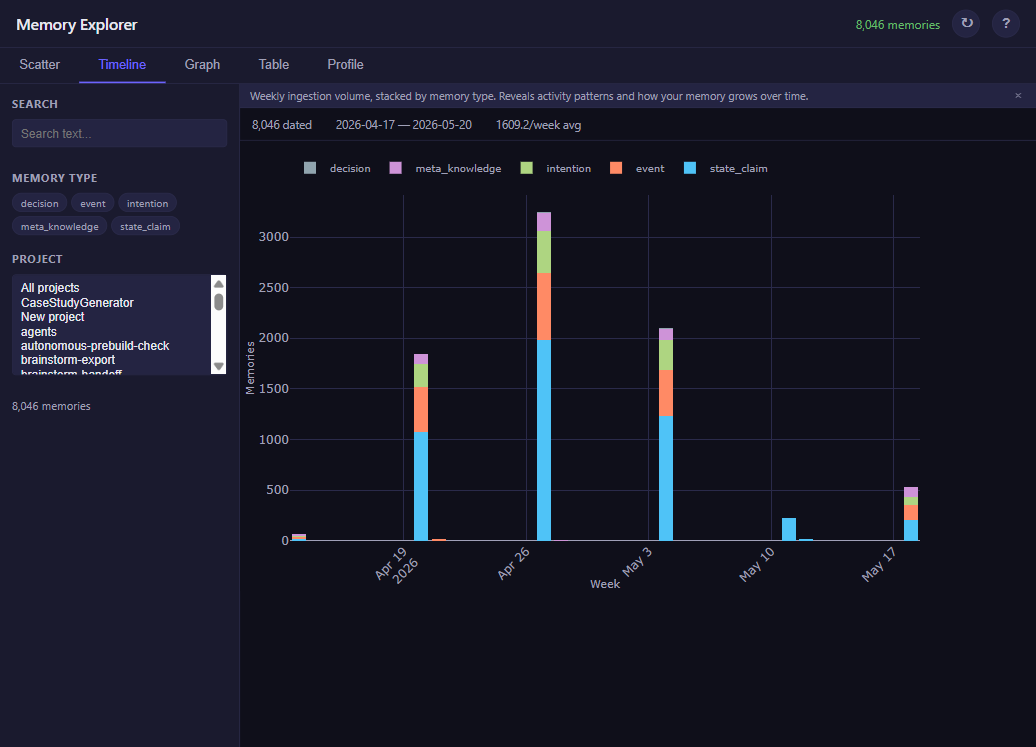
Every one of those bars is the extraction step running automatically, hundreds of times, deciding what to keep and what to drop. The prompt does the thinking — I don’t have to.
What vectors look like
Each extracted fact gets converted into a vector — a list of 1,024 numbers representing its meaning. Send a sentence to Voyage AI, get back numbers. One HTTP call.
Why numbers? Because it lets the system search by meaning instead of keywords. “Peter is redesigning the projects page” should match “website work” even though no words overlap. Facts with similar meaning get similar vectors, and similar vectors are easy to find.
But what does “similar vectors” actually look like? You can’t stare at 1,024 numbers and see patterns. UMAP squashes those numbers down to just two — an x and y coordinate you can plot on a flat surface. The relationships survive the squashing: facts that were nearby in the original 1,024-dimensional space stay nearby on the 2D map.
UMAP is a visualization tool, not a retrieval tool. The actual search happens in the full 1,024-dimensional space — Pinecone never sees the 2D projection. UMAP is useful precisely because it lets you see the structure that the database is operating on. The scatter map below isn’t an approximation of how search works; it’s a faithful projection of the geometry that search relies on.
Here’s the concept with six facts:
Now here’s the same idea with 8,046 real facts — every memory niu-memory has extracted from my conversations over the past month:
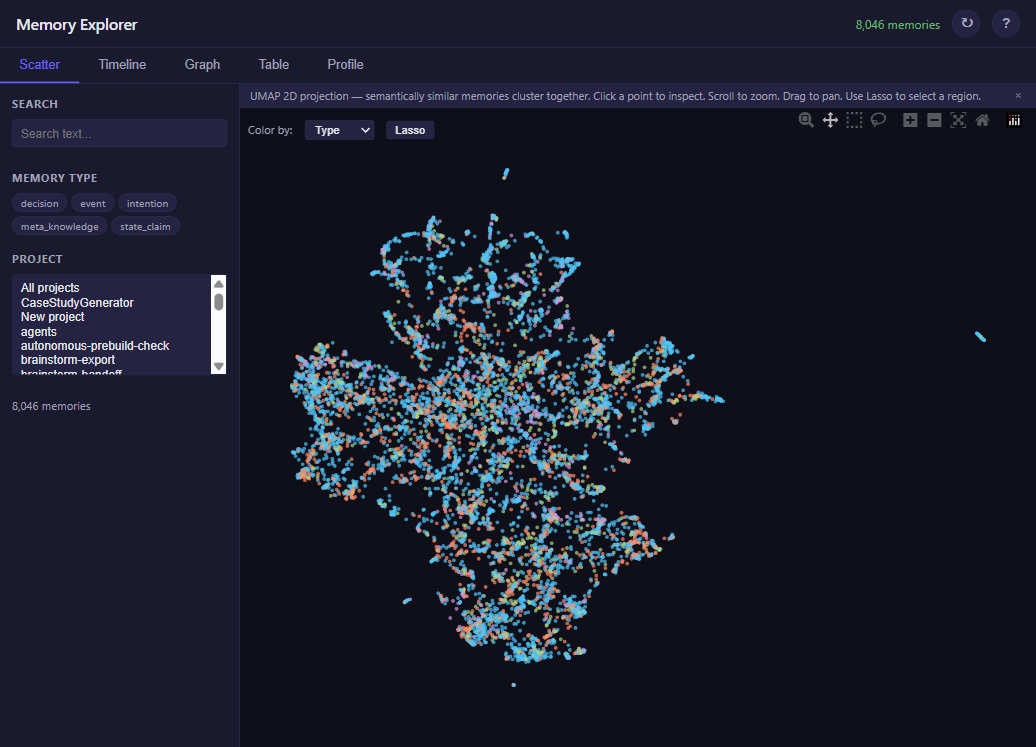
Same idea as the 6-dot diagram — just real data. The clustering is emergent: Voyage AI assigned similar numbers to similar facts, and UMAP preserved those relationships in 2D. When you search, Pinecone finds your query’s position on this map and returns the nearest dots.
What entity relationships look like
Alongside the vectors, niu-memory builds a knowledge graph — a map of the nouns in your memory. When facts mention projects, components, or concepts, the system extracts them and connects them with typed relationships (“project has_component”, “concept has_instance”).
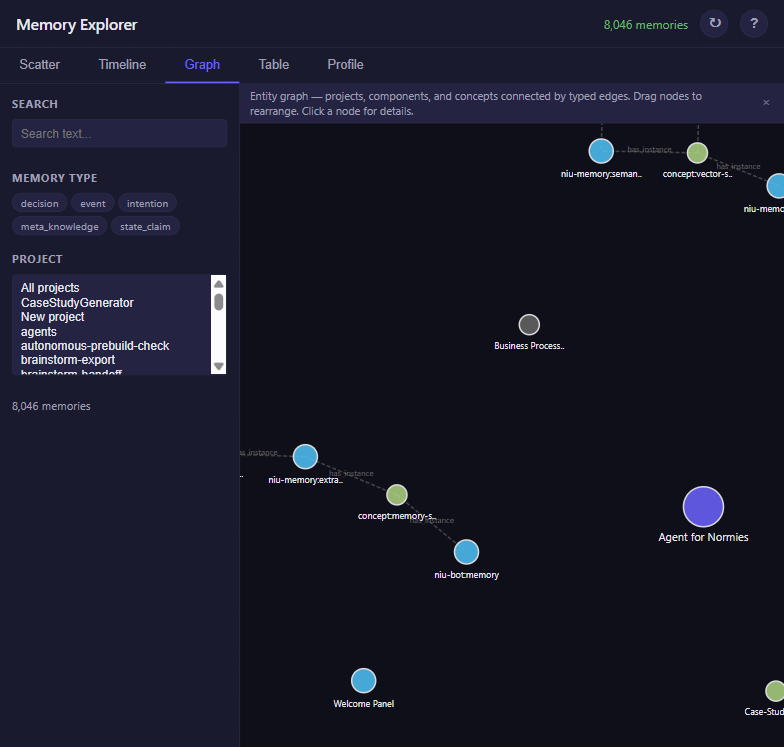
This graph gives search a second retrieval path — not meaning similarity, but structural relationships. Ask about “niu-memory” and the system expands to its components and related concepts, even if those words weren’t in your question.
Deduplication
Before storing, the system checks for near-duplicates. Each new vector is compared against existing facts — if two sit close enough to be the same thing phrased differently, the duplicate is dropped. Prevents memory bloat without losing anything genuinely new.
How a memory gets found
Dashed boxes are inputs and outputs. Solid boxes are processing steps.
Two ways to search
The system runs two searches in parallel — one on the vector map, one on the entity graph.
The semantic path finds the nearest dots on the scatter map. Your question gets its own vector; Pinecone returns the 40 stored facts whose positions sit closest. “Website work” finds “redesigning the projects page” because they land near each other.
The entity-expanded path walks the knowledge graph. If your question mentions “niu-memory,” the system follows graph edges to its components (extraction pipeline, OAuth layer) and related concepts (MCP, vector search), then fetches facts connected to those entities.
Running both catches things a single approach would miss. Semantic finds meaning matches; entity finds structural relationships — things that are related even when they don’t sound similar.
Two-stage retrieval: broad then precise. Casting wide (80 candidates from two paths) followed by a precision rerank is a pattern that appears across modern RAG systems. Recall and precision are in tension — retrieval maximizes recall, reranking restores precision. Doing both in sequence gets you coverage without burying the best results.
Reranking
Up to 80 candidates come back from both paths. A reranking model scores each one against your original question and keeps the top 5. Broad retrieval, then precise scoring.
The response
Each result comes back enriched: creation time, match confidence, and whether the fact is current or potentially stale. Claude reads these and weaves them into its response. You experience it as the tool simply remembering.
How memories stay healthy
A memory store that only writes eventually rots. Months of daily use means thousands of stored facts — some contradicting each other. Yesterday you were “redesigning the auth pipeline.” Today you’re “building the eval framework.” Both true when stored, neither with an expiration date. Without cleanup, search results fill up with stale claims the model treats as current.
Three mechanisms handle this: conflict detection at write time, periodic maintenance on a schedule, and bidirectional sync across devices.
Conflict detection
The decision is logged either way — you can always trace why a conflict was resolved the way it was.
“Newer wins” breaks immediately. “Peter uses Python” (stored in January) and “Peter wrote a Go script today” (stored in June) — a timestamp rule would archive the first. But one describes a stable preference, the other a single event. The LLM judge reads both in context and makes calls that timestamp ordering cannot.
Periodic maintenance
A weekly pipeline runs five passes over the entire store:
Tombstone archival deserves a closer look: superseded facts don’t disappear. They move to a graveyard with a status: archived flag. Search filters them out, but they stay auditable — trace what the system used to believe and why it stopped.
Pruning the technically-true-but-useless facts is harder than pruning wrong ones. “Working on the auth pipeline” from three months ago — still correct, no longer relevant. The staleness scan uses reinforcement as a proxy: facts that keep appearing in search results are still load-bearing. Facts untouched for months are likely context from a finished conversation.
Cross-device sync
niu-memory runs in the cloud. Claude Code runs on a laptop. A sync protocol bridges the gap:
The asymmetry is deliberate: you need memories before you start working, but uploading can happen in the background. Budget-priority ordering — directives first, then recent high-value facts, then the long tail — is what makes the 500-memory sample useful instead of random.
The stack, annotated
| Layer | Service | What it does | Free tier? |
|---|---|---|---|
| Runtime | AWS Lambda + API Gateway | Runs code on demand — no servers to manage | Yes (1M requests/mo) |
| Interface | MCP + REST | Two doors in: AI tools use MCP, everything else uses REST | Open protocol |
| Auth | Lambda Authorizer | Resolves who you are from your API key | Included with Lambda |
| Extraction | Claude Haiku | Reads conversation, pulls out facts worth keeping | Pay-per-use (~$0.001/call) |
| Embedding | Voyage AI | Turns text into searchable vectors | Free tier available |
| Vector store | Pinecone | Stores and searches by meaning, not keywords | Yes (100K vectors) |
| Reranking | Voyage rerank-2.5 | Precision-scores results against the original query | Free tier available |
| Profile store | DynamoDB | Stable preferences, entity graph, and tombstone graveyard | Yes (25GB) |
| Observability | CloudWatch + EMF | 26 operational metrics, 9 alarms across extraction, search, and maintenance | Included with Lambda |
Why build this yourself?
niu-memory is infrastructure I rely on daily — and a worked example. Every concept here — vector embeddings, semantic search, LLM extraction, dedup, two-stage retrieval, entity graphs, conflict resolution, tombstone archival, cross-device sync — shows up across modern AI systems.
You don’t need to be a developer to follow along. The scatter map makes vector similarity visible, the graph makes relationships tangible, the timeline shows extraction at scale. No hand-waving required.
That’s the ethos behind every project on this site: build real things, then show how they work at every layer.